
STL repair
Slicer says it’s broken?
Get a file that prints.
Holes in the mesh, flipped faces, non-manifold edges, two bodies stuck into each other — the slicer shows errors, prints come out with gaps or missing layers. Upload the file to wish2part: it is repaired into a closed solid and given back as STL and 3MF, ready to slice.
Free to try · Free account to download · By pressing “Design my part” you accept the Terms of use. Privacy policy
Short breakFull for todayOffline
Live status →The part designer is taking a short break. Today’s free designs are used up. The part designer is offline right now.
Back soon. New ones open tomorrow. We’re on it. Leave your e-mail and we’ll write once when you can start.
You: My slicer says this file has errors. Repair it for printing and keep the shape as it is.
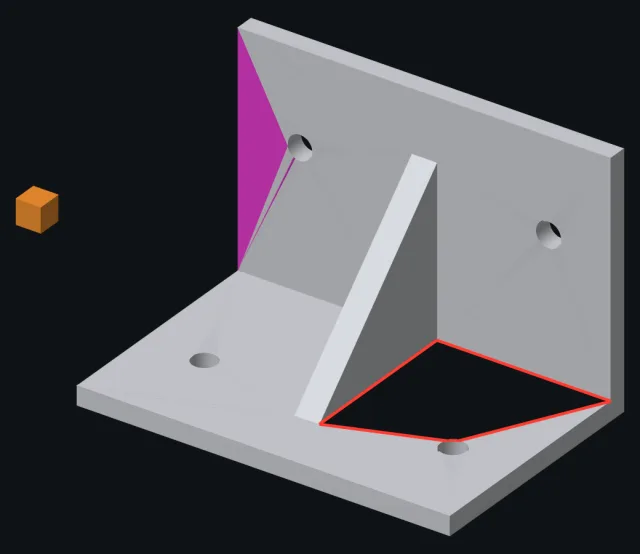
Before. A hole (red), flipped faces (magenta), a loose piece (orange).
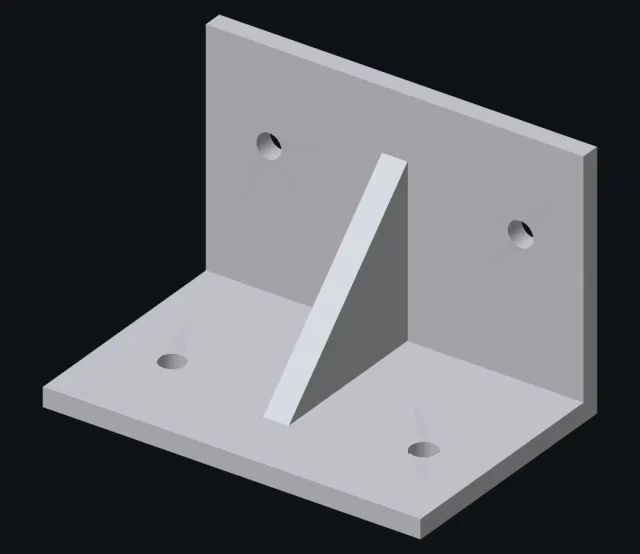
After. One closed solid, same shape, loose piece removed.
We marked the errors for this picture. In the app you don’t see them — you just get the repaired file.
Gaps in the surface are filled, so the part is one closed solid.
Faces turned inside out are flipped back the right way.
Duplicate points merged, broken and zero-area faces removed.
Self-intersections and stray shells handled by a second repair pass.
Typical errors it fixes
- › “Mesh is not manifold” / “non-manifold edges”
- › Holes and open edges in the surface
- › Inverted (flipped) normals
- › Self-intersecting faces
- › Loose shells and floating bits
- › Duplicate vertices and degenerate triangles
- › Exports from SketchUp, Blender and scans with gaps
- › Same for 3MF; STEP files are read as exact solids
Good to know
- – Meshes are simplified to about 60,000 triangles, and to 20,000 when you change the shape — fine detail on scans and figurines gets softer
- – Several parts fused into one mesh: upload them as separate files
- – Very badly broken meshes: you may be asked for another export
- – Files up to 10 MB as a guest, 50 MB with a free account
How do I fix an STL file for 3D printing?+
Most slicers (PrusaSlicer, Bambu Studio) repair small errors on import. When that is not enough, a repair tool closes the holes, flips the normals and removes broken faces. wish2part does this on every upload and gives you a closed STL/3MF back.
Can I also change the part?+
Yes — that is what wish2part is for. Ask in the same chat: bigger holes, a thicker wall, another size. See Edit STL.
Do I get a repair report?+
No, you get the repaired file. The slicer will show you it is clean.
Is it free?+
Free to try as a guest, files up to 10 MB. To download the result, create a free account.