
STL & 3MF editor
Almost fits?
Edit the STL in words.
An STL is a mesh of triangles, not a CAD model — that is why “just make the hole 1 mm bigger” usually means an evening in Blender or Meshmixer. Upload the file to wish2part and say what to change: the part is rebuilt as a solid, edited with real CAD operations and given back ready to print.
Free to try · Free account to download · By pressing “Design my part” you accept the Terms of use. Privacy policy
Short breakFull for todayOffline
Live status →The part designer is taking a short break. Today’s free designs are used up. The part designer is offline right now.
Back soon. New ones open tomorrow. We’re on it. Leave your e-mail and we’ll write once when you can start.
You: Make the screw holes 5 mm instead of 4 mm and the base 2 mm thicker. It holds a small shelf, about 3 kg.
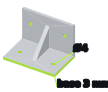
Before. Your STL: Ø4 holes, 3 mm base.
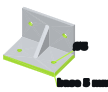
After. Ø5 holes, 5 mm base, PETG, the load it can take calculated. STL, 3MF, STEP.
STL, 3MF or STEP. “Holes for M4”, “fit a 6 mm D-shaft”, “base 2 mm thicker”.
Holes in the mesh, flipped faces and stray shells are fixed automatically.
Holes are cut as cylinders, walls added as solids — not stretched triangles.
Wall thickness, orientation and, under load, strength — calculated before you print.
Edits that work well
- › Resize screw holes (M3 → M4, Ø4 → Ø5)
- › Re-bore for your shaft: round, D-shaft, keyed
- › Make a wall or base thicker
- › Scale the whole part, or only one direction
- › Cut off a part you don’t need
- › Add a hole, tab, rib or mounting plate
- › Split a part with a cut into two printable pieces
- › Same edits on 3MF and STEP files
Where it is weak — honestly
- – Scans, figurines and organic shapes: dense meshes are simplified, edits are coarse
- – Precise changes on freeform, curved surfaces
- – Several bodies fused into one mesh (e.g. meshed gears) — upload them as separate files
- – Features thinner than ~1.2 mm: you get a “wall too thin” warning
- – STEP from an uploaded mesh: flat faces, holes, pins and fillets exact; parts with teeth or organic shapes, or over 12,000 triangles, usually get no STEP
- – Models with a No-Derivatives licence are not changed
How do I edit an STL file?+
Three ways. Mesh tools (Meshmixer, Blender) move triangles — fine for sculpting, fiddly for exact sizes. CAD tools (Fusion 360, FreeCAD, Tinkercad) can import the mesh, but holes and walls are hard to change on triangles. wish2part rebuilds the mesh as a solid and edits it with CAD operations — you only describe the change.
Can I edit 3MF files too?+
Yes, the same way. A 3MF with several bodies becomes several parts, each with its own print setup. STEP files are read as exact solids, so they give the cleanest edits.
Is it free?+
Free to try as a guest, files up to 10 MB. With a free account you download the files, keep changing the part and upload up to 50 MB.
Will my file be repaired?+
Yes, on every upload: points merged, broken faces removed, holes filled, normals turned the right way; badly broken meshes go through a deeper repair. You simply get a printable file back.
Can I convert STL to STEP?+
Yes, for mostly flat parts: you get STL, 3MF and a STEP. Flat faces, holes, pins and fillets of your mesh come out exact, so do the holes and walls we add; meshes over 12,000 triangles get no STEP. See STL to STEP.
What happens to the rest of the model?+
Only what you ask for changes. Before changing the shape for printing (for example a chamfer instead of an overhang), the assistant asks.